Create your first store in minutes

Run your entire business from one powerful platform.

Manage sales, purchases, inventory, invoices, expenses, customers, suppliers, and overall business performance — all from one connected platform.

No credit card requiredQuick setupBuilt for growing businesses

Barakain

One platform for every store

Live

Sales

  • POS
  • Orders
  • Returns

Inventory

  • Products
  • Stock
  • Warranty

Accounting

  • Expenses
  • Payments
  • Reports

Business Report

Sales, stock, and cash from every store in one report.

Sales

Inventory

Accounting

One Login — Access All Stores

Switch between stores directly from the header. Staff can only access the pages and features allowed by their roles and permissions.

Stock Always Stays Accurate

Sales, purchases, returns, and damages automatically keep stock quantities, batches, and serial numbers in sync.

Print Directly from the List

Open an invoice or barcode label and print it directly. No need to download anything first.

Android app

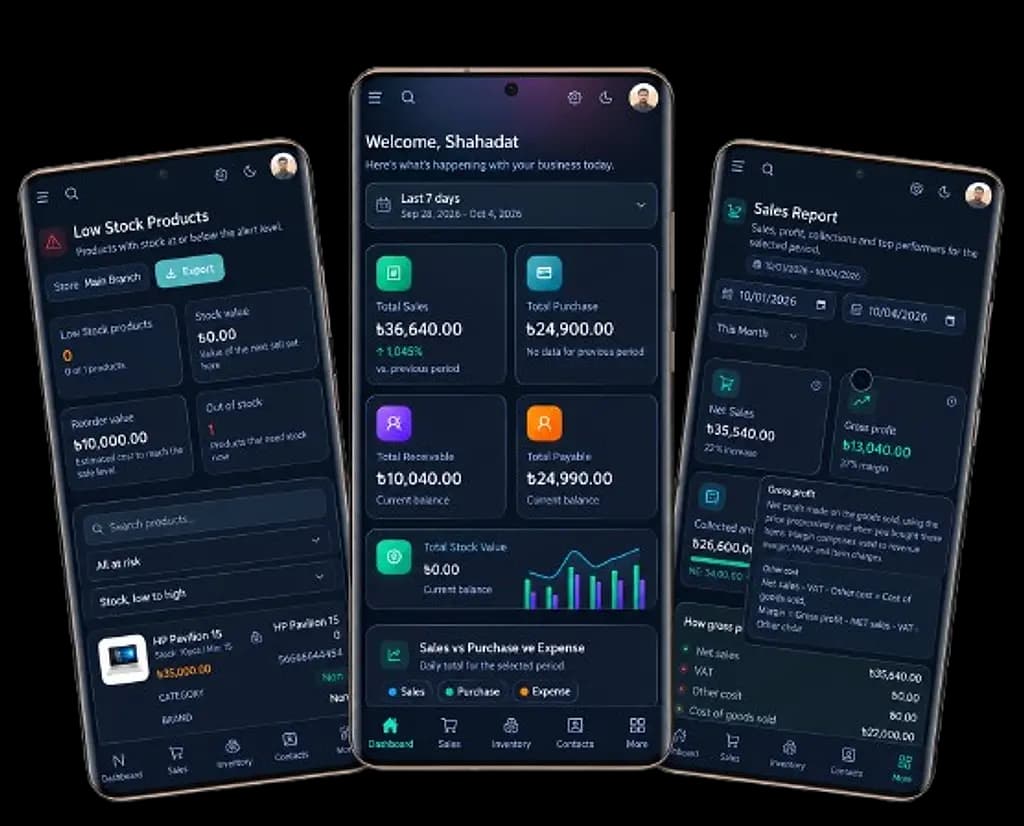
The whole shop, in your pocket.

Sell, check stock, and see today's numbers from the same account you use on the counter.
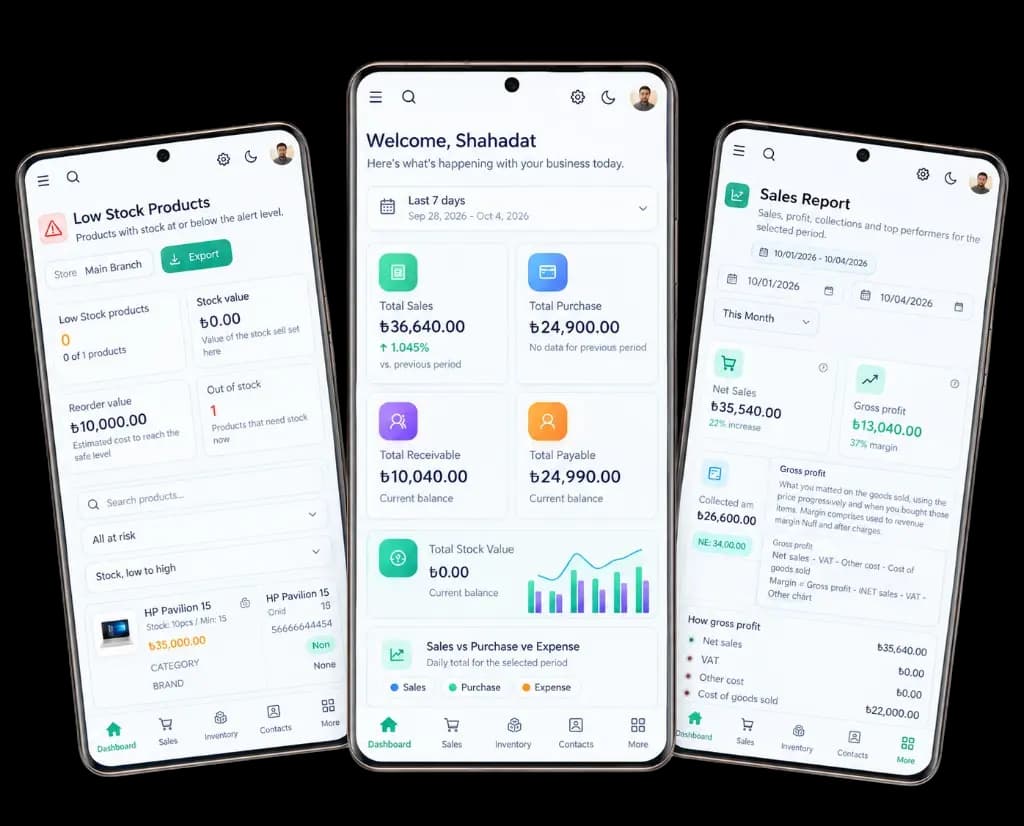
  • Run Your Business From AnywhereMonitor your sales, purchases, receivables, and payables instantly on a single, powerful dashboard.
  • Never Miss a Sale with Smart AlertsGet real-time notifications for low or out-of-stock items before your shelves run empty.
  • Instant Financial ReportsTrack your net sales, gross profit, and cash collections on the go for any day, week, or custom period.
English & BanglaSame data as the web app
Barakain Android app on three phones: low stock products, the dashboard with sales, purchases, receivables, and payables, and the sales report with gross profit

Features

Everything you need to run your business

Manage sales, stock, accounts, teams, warranties, and multiple stores from one connected platform.

Mobile app

  • Manage sales and orders directly from your phone.
  • Check current stock levels at any time.
  • View customer, payment, and outstanding balance details.
  • Track key business reports and performance.

Role-based access control

  • Create separate roles and permissions for employees.
  • Choose which pages and features each person can access.
  • Control permission to view, create, edit, and delete data.
  • Keep access secure according to each responsibility.

Document studio

  • Create document designs that match your preferences.
  • Customize different invoices and business documents.
  • Change logos, information, fonts, layouts, and other elements.
  • Use or print your finished designs directly.

RMA and warranty management

  • Store warranty details for every product.
  • Track warranties by serial number.
  • Manage RMA and return processes with ease.
  • Review the status and history of warranty cases.

Product and stock management

  • Manage products, categories, brands, and units.
  • Track stock by batch and serial number.
  • Automatically adjust stock for purchases, sales, returns, and damage.
  • Quickly identify low-stock and out-of-stock products.

Audit log

  • Keep a record of who did what and when.
  • Track important changes and activities.
  • Review user actions and change history.
  • Maintain stronger control over business data.

Custom barcode label design

  • Design barcode labels to suit your needs.
  • Customize label size, layout, and information.
  • Add product name, price, SKU, barcode, and other details.
  • Print your designed labels directly.

Sales and customer management

  • Manage POS and regular sales with ease.
  • Store customer details and transaction history.
  • Track invoices, payments, and outstanding balances.
  • Run the entire sales process from one place.

Supplier and purchase management

  • Manage supplier details and transactions.
  • Handle purchases and purchase returns with ease.
  • Track supplier payments and outstanding balances.
  • Keep a complete purchase history.

Accounts and accounting

  • Keep track of business income and expenses.
  • Manage customer receivables and supplier payables.
  • Record payment and receipt transactions.
  • Get a clear view of your business's financial position.

Business reports and analytics

  • View detailed sales and purchase reports.
  • Analyze profit, income, expenses, and outstanding balances.
  • Monitor stock value and overall business performance.
  • Generate reports for any selected period.

Multi-store management

  • Manage multiple stores from one account.
  • Switch stores quickly from the header.
  • Grant access to specific stores according to permissions.
  • Manage each store's activity and data separately.

Document Studio

Your Business. Your Brand. Your Invoice.

Create professional, branded business documents with complete control over your logo, colors, fonts, fields, and layouts. Choose from 25+ professional templates and customize every document to match your business identity.

No designer required. No extra design costs for every change.
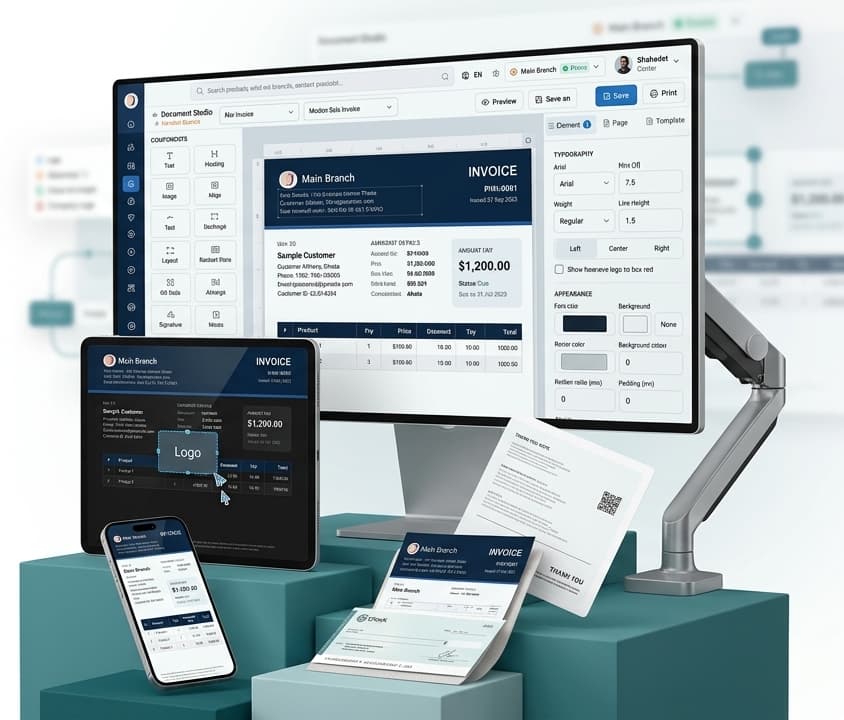
Document Studio editing a branded sale invoice

Pricing

Plans for the whole business.

Simple pricing in Taka. Pay monthly, or pay yearly and save.

Professional

Everything in Starter for up to 5 businesses with 5 users each, plus custom invoice design and advanced reports.

৳900 / month

or ৳10,000 / year (save ৳800)

  • Up to 5 businesses
  • Up to 25 users
  • Everything in Starter
  • Custom invoice design
  • Advanced reports & analytics
  • Advanced inventory features
  • Multi-business management
  • Priority support
Create your account

Custom

Tailored limits and pricing for larger businesses. Contact us for a quote.

Contact us for pricing

  • Unlimited businesses
  • Unlimited users
  • 25+ invoice & report templates
  • Customer & supplier management
  • Warranty management
  • Inventory management
  • Audit log
  • Live support
  • Custom invoice design
Create your account

Frequently Asked Questions

Do I need a separate account for each store?

No. You can manage multiple stores from a single account. Simply switch between stores from the header. New sales, purchases, and stock records are automatically linked to the selected store.

When does stock change?

Stock decreases when you make a sale and increases when you make a purchase. Sales and purchase returns automatically adjust stock as well. Damaged products are deducted from stock, and serialized products are tracked by their specific serial numbers.

How do I print an invoice?

Click the invoice number from your sales or purchase list. The document will be generated using your selected design and can be printed directly. You can customize your invoice layout in Document Studio.

Can I use Barakain in Bangla?

Yes. Barakain supports both English and Bangla. You can switch between languages anytime using the language selector.

What happens when I reach my plan limit?

Once you reach your plan's limit, you won't be able to add additional items, stores, or other limited resources. You can upgrade your plan when needed. All your existing records will remain safe and accessible.

Can I reverse a damage record?

Yes. If you delete a damage record, the corresponding quantity and serial numbers will be added back to your stock.

Request demo

See Barakain in action.

Leave your details and our team will contact you to schedule a free demo tailored to your business type and needs.
  • A live demo of sales, stock, accounts, and reports
  • Help setting up your stores, products, and staff
  • Advice on the right features and plan for your business
  • Answers to your questions and guidance on using the app

We'll only use your details to contact you about the demo.